NVIDIA driver SSD writes became a real complaint with GeForce Game Ready 621.14, released on 4 November 2026. On some PCs the NVIDIA Display Container LS service keeps rewriting one log file on the system drive, even when nothing is running. The first detailed report, posted on 9 November in NVIDIA’s 621.14 feedback thread, measured 515 MB from that one process in five minutes, against under 2 MB on the previous driver, 621.01. Driver 621.24 followed on 12 November with “N/A” under open issues, and users report the same behavior on it.
The number in most headlines, 30 GB an hour, comes from a single user on 621.24 and from a process counter. Your SSD keeps its own count of what it received, and reading it takes about an hour. Below is what the service writes and why deleting the file helps for a while, how to measure your own PC, what each reported rate costs a 1 TB drive over its warranty, and which fix suits which setup.
What NVDisplay.Container.exe is writing
The process is NVDisplay.Container.exe, which runs as the NVIDIA Display Container LS service and backs the NVIDIA Control Panel and the NVIDIA App. The file it rewrites is C:\ProgramData\NVIDIA Corporation\nvtopps\nct\nvlog.nvlgstg, a binary log.
The first reporter, Andergraude, tested an RTX 4070 SUPER on Windows 11 Home 25H2 with two browser tabs open. On 621.14 the log grew by about 325 KB a minute and Resource Monitor showed the process writing at 4.6 to 5.2 MB per second. After a clean install of 621.01 on the same PC, the log grew by about 0.5 KB a minute.
Other reports range widely:
- a second user in the 621.14 thread saw more than 3 GB in ten minutes, along with stutter in games and video and a hitching mouse pointer while the logging ran;
- AyzekUorren, posting on 14 November in a separate thread about 621.24, measured about 30 GB an hour with the NVIDIA App’s telemetry options already off, over 70 GB in long sessions, and 500 MB to 1 GB more with every Alt+Tab;
- Wccftech reproduced the writes on its own Windows 11 PC with an RTX 4090 at about 1.43 MB per second, or 5.2 GB an hour;
- a ComputerBase reader on 621.14 saw 3 to 5 MB per second from the process even on his best runs, 10 to 18 GB an hour;
- an RTX 5070 Ti owner on 621.24 tried idle, the overlay, YouTube in Edge and Alt+Tab, and the process never appeared among the writers.
Nobody has yet pinned down which setups trigger it. Some users on ComputerBase and Guru3D suspect the background shader compilation NVIDIA added in the spring, which also runs while the PC is idle, but no one has shown a link. Tom’s Hardware also cites a user for whom three clean reinstalls with DDU changed nothing.
Why deleting the log helps for a while
The file is older than this driver. In January 2025 an XPS owner on Dell’s community forum traced nvlog.nvlgstg with Process Monitor and found a single write of 10,272,768 bytes at offset 4,096, and the poster says the logging hit the disk about every 30 seconds. In other words, most of the file is saved again each time. A 10 MB write every 30 seconds adds up to about 1.2 GB an hour.
If the whole file gets rewritten, the hourly total depends on two things: how big the log is and how often it is saved. A 20 MB log rewritten every 2.4 seconds comes to 30 GB an hour. Andergraude’s numbers fit that pattern. After he stopped the service, deleted the log and started it again, the process wrote 48 MB in five minutes instead of 515 MB, a drop of about 91%. The log then grew back from 2.6 MB to about 20 MB. NVIDIA has said nothing about how the log works, so this is our reading of the posted figures. It also explains why the cleanup resets the meter without fixing anything.
Measure what reaches your SSD
Resource Monitor and Task Manager count what a process asks Windows to write. In the same five minutes in which Andergraude’s process counter showed 515 MB, the whole C: drive took 270 MB, so the counter read about 1.9 times higher than the drive total. On 19 November an RTX 4090 owner posted 2.0 to 2.7 GB a minute from the process counter after 43 hours of uptime. If that much reached the drive around the clock, a 600 TBW SSD would hit its rating in about six months. The SSD’s own counter, the figure the warranty uses, settles the question for your PC:
- Check the driver version in the NVIDIA App under Drivers, or run
nvidia-smiin a terminal. The reports concern 621.14 and 621.24. - Press Win+R, type
resmonand open the Disk tab. TickNVDisplay.Container.exeunder Processes with Disk Activity and look fornvlog.nvlgstgand its Write (B/sec) value. - Open CrystalDiskInfo or your drive maker’s tool and note Host Writes. On NVMe drives the raw Data Units Written value times 512,000 gives bytes.
- Close your browser and games, leave the PC idle for an hour, then read the counter again. The difference is everything all programs wrote to that drive in the hour, so the NVIDIA share can only be smaller.
How much 30 GB an hour costs a 1 TB drive
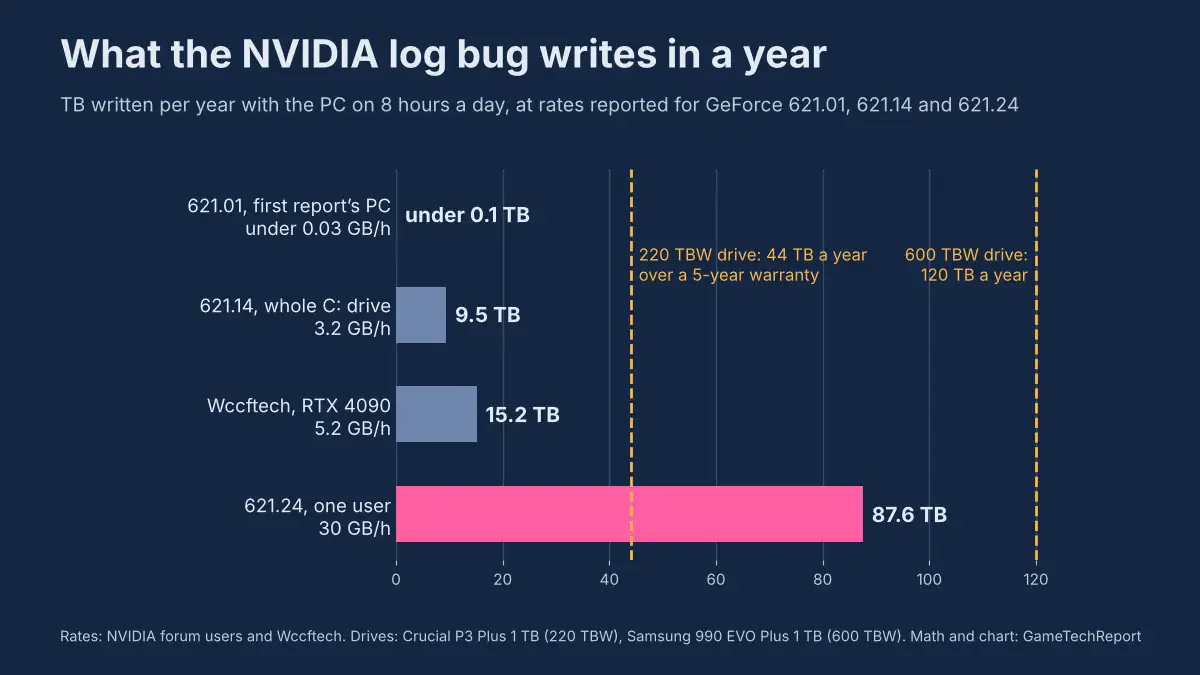
| Rate | Where it comes from | Per year, PC on 8 hours a day | Of 600 TBW in 5 years | Of 220 TBW in 5 years |
|---|---|---|---|---|
| under 0.03 GB/h | 621.01, first reporter’s PC | under 0.1 TB | under 0.1% | 0.2% |
| 3.2 GB/h | 621.14, whole C: drive, first report | 9.5 TB | 7.9% | 21.5% |
| 5.2 GB/h | Wccftech, RTX 4090 | 15.2 TB | 12.7% | 34.5% |
| 30 GB/h | one user, 621.24 | 87.6 TB | 73% | 199% |
At 30 GB an hour the bug alone would use up the P3 Plus rating in about two and a half years and the 990 EVO Plus rating in under seven. At the 5.2 GB an hour Wccftech measured, neither drive gets close within its warranty. The bigger risk sits with cheap QLC drives of 500 GB or less, whose ratings are lower still.
The damage so far is small. From 4 to 19 November, 15 days at the worst reported rate and 8 hours a day, comes to 3.6 TB, or 0.6% of a 600 TBW drive and 1.6% of a 220 TBW one. Months of it would matter, and an hour with the drive’s counter tells you which row of the table your PC is in.
Four fixes and who each one suits
Reset the log. Open services.msc, stop NVIDIA Display Container LS, delete nvlog.nvlgstg from the folder above and start the service again. You keep 621.24 and its game profiles. The effect fades as the file grows back, so it needs repeating, and one user in the forum thread did not get the same drop.
Roll back to 621.01. That driver, from 21 October, is the last one users call clean, and a user in the 621.24 thread says the writes stopped after going back. Download the 621.01 installer first, remove the current driver under Settings > Apps > Installed apps, run a clean install and turn off automatic driver updates in the NVIDIA App. Keep in mind that 621.01 is the driver whose video freezes and black screens NVIDIA fixed in hotfix 621.12 on 27 October and then in 621.14, so those problems can come back.
Set the service to Manual. Stopping NVIDIA Display Container LS and setting it to Manual ends the writes completely. The NVIDIA Control Panel and the NVIDIA App will not open until you start the service again, which suits a PC whose display settings rarely change.
Block the log folder. A ComputerBase forum user on 621.24 denied the SYSTEM account write and delete rights on the nct folder, restarted the service and reports that the counters froze while the NVIDIA App kept working. It is a single report, so note the change and remove the deny entry in the folder’s Security tab before you install the driver that fixes the bug.
Same service, earlier fixes
NVDisplay.Container.exe has been here before. In 2019 driver 430.39 made it load the CPU in the background, and NVIDIA confirmed the bug and shipped a hotfix. On 31 August 2021 the release notes for 471.96 listed a fix for “NVDisplay.Container.exe constantly writes data to C:\ProgramData\NVIDIA Corporation\nvtopps\nvtopps.db3” under bug ID 3350171. That was the same folder with a different file. ComputerBase adds that smaller logging problems of this kind have come and gone since at least driver 471.41.
AMD went through a similar case weeks earlier. Its staff confirmed the Radeon idle writes on 21 October and Adrenalin 26.11.1 fixed them on 12 November, as we covered in our Radeon SSD writes article. As of 19 November, 15 days after 621.14 and 10 days after the first detailed report, NVIDIA has not acknowledged the GeForce writes in public. Going by 2021, the sign to look for is a line naming NVDisplay.Container.exe or nvlog.nvlgstg in the fixed issues of the next Game Ready or hotfix notes. We will update this article when that happens.
About the sources: the measurements come from posts on NVIDIA’s GeForce forum (the 621.14 and 621.24 feedback threads and a separate thread on 621.24), Wccftech’s own test, Tom’s Hardware, ComputerBase and its forum, and a Dell community thread from January 2025, checked against more than 35 news sites and forum threads in English, German and Japanese. GameTechReport has not reproduced the writes on its own hardware yet.